The Retro Challenge is an interesting idea – pick a project that is over 10 years old, and blog about working on it for a month. Most folks pick older computers that they acquire and fix up, or do something interesting, such as add network functionality to Apple II’s, or running Twitter clients over serial.
These are amazing hardware projects, but hardware is not really my forte even if I want to do more of it. Plus, I’m travelling during October quite extensively, so I need a project I can do within a virtual machine in my spare time in hotel rooms with carry on items only.
Software is more my thing, so I want to pick a piece of software that is more than 10 years old, and do something useful with it, like make it work on modern hardware to let it live again. I didn’t want to retread where others have been, and as you’ll come to see, I have definitely bitten off more than I can chew.
Previous Retro Challenges have done a lot with early 80’s computers, usually 8 bit computers, but as I used these when they first came out, I wasn’t really interested in that. I pretty much jumped from 8 bit computers directly to 32 bit computers (Macs), bypassing 16 bit computers like the Amiga and Atari, and for what it’s worth, DOS. That’s right, DOS and Windows 1.0-9x was never my daily driver, with a few times I was forced to do so at Uni, or fixing up relatives’ computers. When I bought my first PC in the mid 1990’s, it was a HP XU dual Pentium Pro workstation running Windows NT, and mostly Linux. I’ve owned around 20 Macs in my life, and I’m sure I’ll own a few into the future. I’ve also owned a bunch of weird things, like a VT102 terminal (a real one), Acorn Risc PC that I tried getting RiscIX running, Sun Ultra 10 workstation running Solaris, and a DEC Alpha PC164 that I ran NetBSD/alpha and then Linux for Alpha on. I’ve owned a Atari Portfolio (more disappointing than you think), a Newton 2100 (better than the critics made out), various PDAs, and an Amiga 500Plus I bought in the UK.
I currently run a Lenovo T460s, which is my first PC in over a decade, and it’s actually pretty good.
Project ideas
Something that always interested me was how a port to a new processor gave a dying platform a bit of additional life simply because now more people can use it or at least try it out. In particular, AmigaOS was ported to PowerPC to run on various iterations of the phoenix Amiga hardware platform and various accelerator cards for Commodore Amiga. Additionally, RiscOS was ported to the Raspberry Pi, which is much faster than any real Acorn hardware, and it’s actually pretty decent, if a little lacking in modern software.
So from a 16 bit point of view, Amiga is a popular choice, and I don’t know that I would be able to add anything of particular value. Both AmigaOS and RiscOS are actively maintained and fails the spirit of “must be older than 10 year old” test unless I involved original hardware, which is out for me as I’m travelling.
So what other 16 bit platforms were popular that I missed out on? I don’t do consoles. I’ve owned a PS2 and an original XBox, and I never really used either of them. Consoles aren’t really interesting to me, plus I can’t carry them around during October.
Atari TOS was never ported off the original m68k platform. There are various 68060 accelerator cards and a complete clone of the platform called FireBee based on the Motorola ColdFire processor architecture running at around 260 MHz, but simply doing something with an 68060 or 2013 era ColdFire based system doesn’t meet the requirements of the RetroChallenge. Plus, I can’t haul around an ST.
Looking on eBay and Craigslist, there’s basically no Atari ST / TT / Falcons for any price, and new Firebees are too new. The scarcity of Atari ST / TT / Falcon and clones, coupled with the lack of space for a retro computer in my home office, and my travel means that I needed to shelve the plan to work on original hardware.
So what’s portable, or could work within a virtual machine whilst I was travelling? My Raspberry Pi Model B. However, whilst the specs for the Raspberry Pi is fantastic compared to the specs of the original ST, there are some limitations to this platform which I will touch on later.
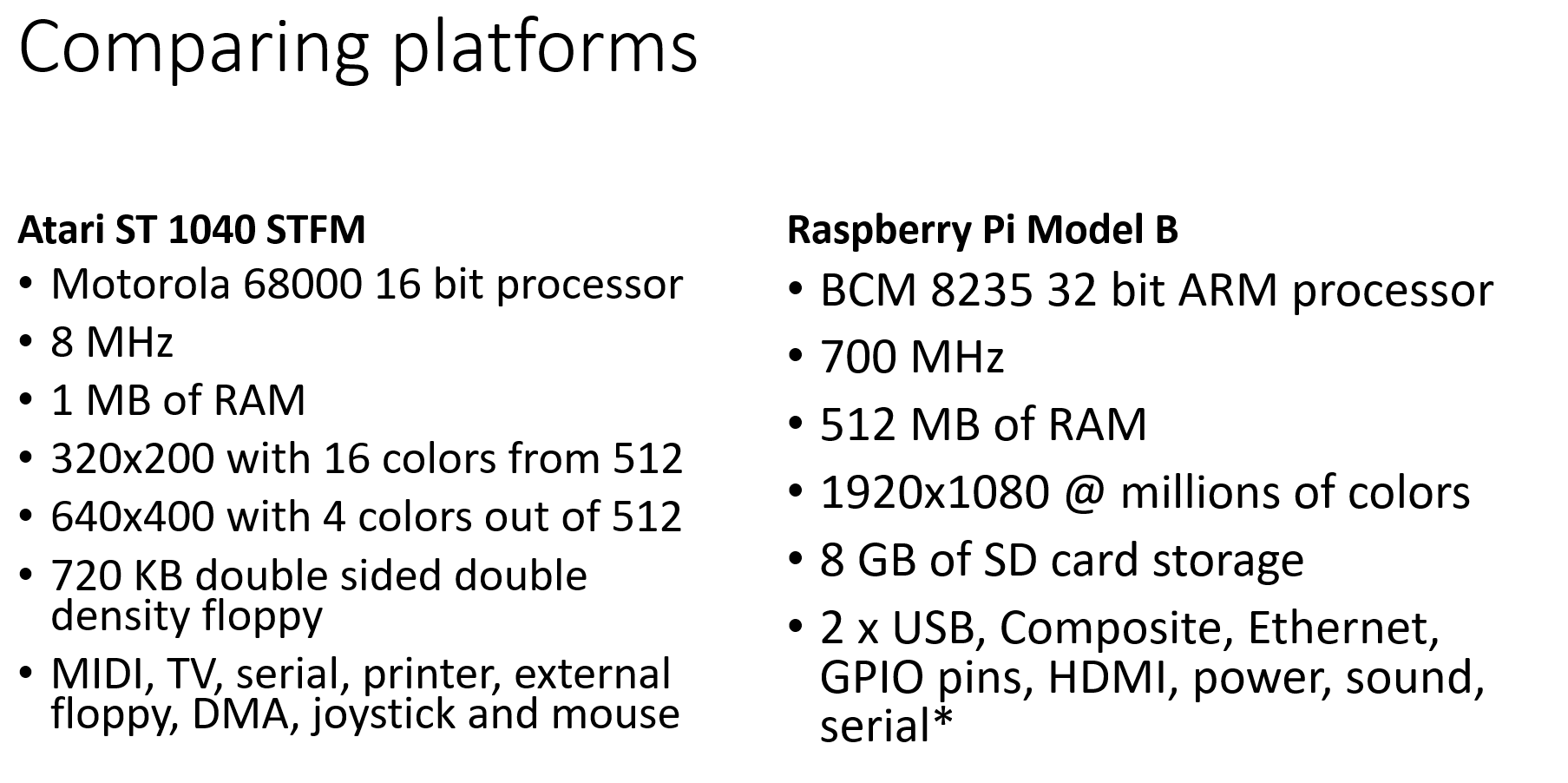
I want to make sure that anything I do might end up revitalizing the Atari platform, or at least give it a new life, rather than be stuck on the m68k platform forever, and thus stuck within emulators such as Hatari and the amazing Aranym, which is a m68k based software emulator for FreeMint and other Atari based operating systems, but basically designed to go REALLY fast on modern hardware, so it’s not trying to be 100% compatible, but usefully fast whilst running old Atari apps, and even many games. It often runs a great deal faster than even modern hardware like the Firebee.
Starting
Before the challenge proper starts, you’re allowed to do some prep, and work out what you want to do. In fact, without this step, I reckon it’s almost impossible to do much other than faff about and write blog entries. So I started to estimate the effort.
A few months back, I reviewed if this was even possible. The original Atari ST’s had their operating system in ROM, and even later ones rely the TOS ROM to do various things, such as boot. If the source to TOS wasn’t available, this project concept is dead, as I’m not going to buy an Atari (for now) … and they don’t seem to be particularly available in the US. I understand that Atari ST was much more popular in Europe than in the US, and with most software written for PAL systems, it seems only the most diehard Atari followers in the US who committed to the platform. So there’s not a lot of systems going.
Luckily, the original TOS was “improved” back in the late 1980’s prior to Atari’s demise by a tinkerer who created MiNT (MiNT is not TOS), which created a new Unix like kernel and GPL utilities to run on the Atari. Atari saw this was good and hired the developer, and that’s pretty much how TOS officially became MiNT, and that’s how TOS (and Mint) became open sourced before they died. Without this history, any chance of new life would be over as only emulation would be possible.
What is MiNT? It’s a multitasking kernel that allows more than one TOS program to run at once, but it’s more than that – it has a Unix like kernel that allows many POSIX utilities to be compiled and run.
Eventually, MiNT begat FreeMint. AES, the Atari’s desktop environment became XaAES, also open sourced and freely available on Github. It’s very retro, full of blends and stuff.
FreeMint seemed to fizzle out around 2004. By this time, Atari had been dead for nearly a decade, one of the key contributors passed away, and there was no PowerPC accelerator cards, so basically, beyond work to bring in more and more of the Unix userland, and “improvements” to XaAES such as moving it to kernel space (! – remember that most users were running on 8 MHz systems, with a few on 30 MHz 68030’s, so basically this might seem crazy now, but to allow the then modern look and feel, I’m betting that kernel was the right place.
The FreeMiNT project hasn’t seen a whole lot of maintenance, mainly nips and tucks and work to support the FireBee on the ColdFire processor and various device drivers, and additional support for Aranym. I’m sure I’m understating it, but there’s a lot of technical debt in this code base, and I’m really hoping that it will not bite me too hard.
Which TOS?
By this point, you’re thinking job done in terms of selecting the project, but it’s not that simple. There is
- Original TOS, which I’m not sure anyone uses any more except original owners
- EmuTOS – used by Hatari, basically an improved version of TOS with AES, and will run on Aranym and FireBee.
- FreeMint used on the original hardware, FireBee and emulators, which means there’s active users of this platform today
- SpareMint, a FreeMiNT kernel + package manager
- FireTOS for FreeMiNT – used on the FireBee
- FireTOS full – used on the FireBee
I could go retro, and try to port a simpler amount of software, which is the Original TOS / EmuTOS. Unfortunately, these are original sources, and make a lot of suppositions about the underlying hardware.
Folks think that Amiga had more custom chips and is harder to emulate, but the reality is that AmigaOS is probably an easier port than Atari, as Atari used software to achieve much the same things as the Amiga. So in some ways, TOS knows and assumes a lot more about the platform than many operating systems. Things like timing loops, where IO is located and how that works.
I didn’t want to get into package management or trying to replicate an entire operating system, and I couldn’t do something with the FireBee as it’s too new, so basically, I’m down to FreeMint. A lot of folks do interesting things with FreeMint, it runs on real hardware, newer hardware like the FireBee, and emulators like Hatari and Aranym.
Plus, Freemint has code for newer CPUs and drivers for the Firebee and Aranym, and more an abstracted view of the hardware platform that whilst not as clean as say NetBSD, is certainly a good start. Plus, there’s “only” 45 assembly language files, but obviously, that’s not everything required to boot on an entirely new platform.
False starts
Looking around, I found a great reference for building a new operating system on a Raspberry Pi. I found that my model supports a serial console with a special cable, which will be essential for getting the platform running. However, the process of building a kernel, writing it to flash, booting and so on will be a slow nightmare.
The Raspberry Pi 3 has a UART for serial that you can re-enable in config.txt, and more to the point, it can boot an operating system over the network. The workflow will be compile a kernel, deploy to a local directory, net boot, start the system over serial, and debug. It might be some time before I can manage to remotely debug the kernel, as you can do with Linux, and indeed this is not a goal for October.
However, this does bring up a thorny issue. There are NO good emulators for the Raspberry Pi. I don’t know why this is. If I tackled a BeagleBone, I can emulate that. So realistically, the first boots won’t be in an emulator unless I write for Beaglebone and then port to the Raspberry Pi, and that seems … more difficult.
When I looked at the FreeMint source, I saw Minix and BSD bits and pieces, as well as GPL tools that provide much of the shell and userland. So I thought, instead of porting that, why not start with something that already boots on the Raspberry Pi, and port XaAES and a FreeMint (TOS) library to that?
Minix
I spent some time looking at Minix. Initially, it seemed an excellent fit. FreeMint gets its /u file system support from Minix 2. Why not continue the obvious pathway the original author of FreeMint was going, by bringing more Minix to FreeMint, and thus bypassing a lot of the porting process, concentrating on creating a FreeMint and XaAES Minix server, and relying on Minix to provide the rest of the platform (memory, scheduling, pipes, file systems, network, etc).
It’s a fading platform now that Andy Tanenbaum has retired. It barely runs on Beagleboards, no longer has SMP support, no longer runs X11, is 32 bit only on Intel processors, and does not support the Raspberry Pi. A few grad students had a summer project in 2015 or so, and they got it booted on a Raspberry Pi 2, but their work was never merged, and now newer versions of Minix exist which means integration of those patches might be tough. I didn’t have a Raspberry Pi 2 to test that hypothesis and it doesn’t emulate, so basically, I was a bit shut down.
Sadly, even though I think if the FreeMint project wanted to re-platform to something a lot more modern, Minix 3 is probably not the right choice for this project.
NetBSD
Minix itself has been for a few years now re-platforming itself to use NetBSD userland, so basically replacing a monolithic NetBSD kernel with a Minix microkernel and all that implies. This process is ongoing, so I thought, well maybe I could use NetBSD to run a container or library containing FreeMint (TOS) + XaAES on top of X11.
Again, I hit roadblocks. NetBSD 7.1 is a tier 2 port for NetBSD on the Raspberry Pi 2 and 3. There’s no support for the original Raspberry Pi as far as I can tell. Again, no emulation so I couldn’t test it out. Lastly, NetBSD has jails, but no containerization or domains or Xen. There is sailor, a container platform, but it’s not designed to run another OS.
At least I could port the code to run on top of NetBSD, but if we wanted fast recompilation of old ST / TOS software to run on top of this platform, it wouldn’t look much like an Atari ST at that point.
FreeBSD
As I have a Raspberry Pi 1, I thought about doing the same using FreeBSD, but even though there is better support for the Raspberry Pi, emulation is an issue, and containerization or domains is still missing, so it would look and feel like FreeBSD until you ran an Atari app, and that’s like running a KDE app on a Gnome desktop. I wanted to do better.
Linux
Linux was always going to be my cross-compiling choice, so I looked at emulation or if I could do something like run an Atari subsystem with XaAES running natively instead of X11. But realistically, even though this might be possible, it’s too much work for one month. Plus my concerns about it feeling like Linux that can run AES programs means that I don’t think you’re really getting a feel for the Atari, more of a modern version of GEM for Linux, which considering it once ran on PCs, isn’t really a win.
This brings me back to…
Bare metal
The obvious choice by now is that we will cross-compile in Linux, and run on bare metal. I think this gives the best shot of FreeMint on ARM feeling like it is really FreeMint, and will hopefully bring old ST fans out of the closet and new folks interested in the ST platform for a modest investment in a Raspberry Pi, especially considering the scarcity and insane price of real vintage hardware coupled with considerable performance improvements over the original platforms, even the Firebee.
I will acquire a Raspberry Pi 3, because it can netboot, and a serial console cable, because for a while at least, I will be on the road and will not have a HDMI monitor I can plug it into. Plus, although I have no plans for a 64 bit port of the operating system (that would be TOO far for my goals), at least it’s there for the future if anyone wants to have a shot.
Goals
My goal for October is to achieve cross-compilation of the FreeMint source, and in particular the kernel (and not necessarily XaAES, tools, or shared) as a proof of concept, and hope to demonstrate the FreeMint boot loader and process looks and feel just like an original Atari ST / TT / Falcon once the Raspberry Pi’s boot loader goes away, starting with the memory test and boot sequence.
This will require porting a 16 bit / 32 bit operating system without memory protection or virtual memory to a 32 bit platform that has both protected memory and supports virtual memory, that in terms of hardware looks nothing like the original platform.
I bet there’s esoteric bit blasting going on that makes perfect sense in a CPU and memory constrained mid-80’s platform, trying to get Amiga like performance on extremely economy hardware. Remember, the Atari ST platform did not have DMA or a blitter until 1989, so most software doesn’t assume it exists. Although the Amiga was a technical powerhouse, I think the ST platform actually uses more of the overall platform just because it has to.
Do not doubt for one second that I’ve chosen an easy project, or even a possible one. I will give it a shot and try to have fun along the way.
SLOC Directory SLOC-by-Language (Sorted)
214746 sys ansic=151941,asm=62672,sh=113,perl=20
84679 xaaes ansic=83626,asm=972,cs=66,sh=15
54107 tools ansic=52712,awk=786,asm=286,perl=234,sh=89
2400 shared ansic=1775,yacc=447,lex=178
512 doc ansic=233,asm=149,cpp=87,sh=43
0 fonts (none)
0 top_dir (none)


Totals grouped by language (dominant language first):
ansic: 290287 (81.44%)
asm: 64079 (17.98%)
awk: 786 (0.22%)
yacc: 447 (0.13%)
sh: 260 (0.07%)
perl: 254 (0.07%)
lex: 178 (0.05%)
cpp: 87 (0.02%)
cs: 66 (0.02%)
So why do this?
I think it’ll be fun. I’ll learn ARM assembly language, porting an operating system from scratch on bare metal. I will re-learn hardware and device driver programming again (I did a couple of Linux device drivers back in the 1990s, Matrox Millennium support for XFree86, and HP’s PPA print drivers for gs, both of which is still included is most Linux distros to this day). Lastly, if it does work, I hope that I can attract the original Freemint project to include it, and hopefully be the start of a renaissance of the ST platform, even if it’s just within the retro / virtual / vintage community.